
Photo by Andrew Bertram on Unsplash
Content#
- Go with the Kotlin Flow 🌊
- Diving deeper into Kotlin Flow 🏊♂️ [Coming soon]
- Migrating from legacy code to Kotlin Flow 🚚
- Flow on Android 🤖 [Coming soon]
Preface#
Kotlin Flow is an implementation of Reactive Stream specification made on top of coroutines and channels for Kotlin.
The aim of this article is to take you through why Kotlin Flow was designed, some basics, differences between other reactive stream specifications and multi-platform [obviously everyone ❤️ multiplatform these days].
History behind Flow ⏳#
The history is spread across the internet but long story short, after the launch 🚀 of coroutines, people started enjoying coroutines due to its simplicity and structured concurrency.
Also coroutines did give an easy way to prevent callback hell but it didn’t provide us with any reactive APIs similar to RxJava.
This combined with growing usage 📈of Kotlin, people started expressing their interest to have a pure Kotlin implementation of RxJava to leverage the power of Kotlin like type system, coroutines, etc combined with Kotlin multiplatform people expressed to have the ability to use reactive programming for all platforms i.e shared implementation for JVM, JS and Native.
At the end it’s important that any new library raises the bar compared to existing ones and is not just a replica with slight improvements
And Kotlin Flow does raise the bar 📶 and that’s why Flow came into the picture with growing needs from the community plus a scope to raise the bar.
Kotlin Flow 🔀#
You know this by now, Kotlin flow is reactive (i.e. async handling of data streams), and cold ❄️ (i.e. it won’t start emitting events until there’s an observer) and it’s part of Kotlin coroutines library.
In simple words, you can think of it like a Collection and all of the collection operators [like map] except it’s cold ❄ in nature
What’s so special about Kotlin Flow#
- Null safety in streams
- Interoperability between other reactive streams and coroutines
- Supports Kotlin multiplatform
- No special handling for back pressure [thanks to coroutines]
- Fewer and simple operators [because single operator can handle synchronous and asynchronous logic — we will look into this in next article]
- Perks of structured concurrency 🧱
Basics#
Flow is similar to a list of items, it has all sorts of operators like map, filter similar to any list or collection except it is cold ❄️ in nature and is only executed when terminal operator is called.
There are various ways to build a flow using flow builders. One of the common is using flow builder function ⬇️
Run this snippet in Kotlin Playground
The following sequence diagram shows the order of events for the sample code above where the flow is not executed i.e value is not emitted until the terminal function collect is called.
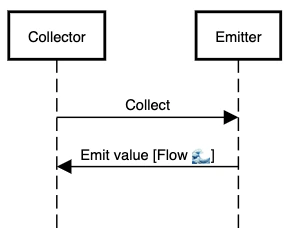
The collector is the Flow interface with a single suspend function collect which is the terminal operator.
public interface Flow<out T> {
public suspend fun collect(collector: FlowCollector<T>)
}
and emitter is FlowCollector with a single suspend function called emit
public interface FlowCollector<in T> {
public suspend fun emit(value: T)
}
Internally, the whole mechanism of collector and emitter is just about calling functions on both the sides. The suspend keyword is what adds the magic 🔮
Sprinkle some coroutines 🤏#
The best part about Flow is its interoperability with coroutines because both the collect and emit are suspend functions 😍
That means the flow builder can contain any type of asynchronous heavy operation like loading from the database ⬇️
Run this snippet in Kotlin Playground
You can apply all sorts of operators similar to lists before the terminal operator collect. You can find the list of operators here.
Since Flow is built on top of coroutines, it borrows the same structured concurrency which we know and love ❤️
Ideology of Flow#
Flow follows following principles or ideology for a similar API:
1. Context preservation#
The context is encapsulated and it’s never allowed to go downstream ⬇️. There is only one way to change the context of a flow; using the flowOn operator that changes the upstream ⬆️ context [basically everything above the flowOn function]
This avoids the confusion of which thread your code is exactly going to run on.
Run this snippet in Kotlin Playground
2. Exception Transparency#
Flow implementations never catch or handle exceptions that occur in downstream ⬇️ flows, they catch only for upstream ⬆️ using catch operators; this is again due to context preservation.
Actually there is no onError 😅, there is only collect one single thing for Flow making it transparent to catch them and a single place where you receive all types of state [either success 🎉 or failure 🙅♂️].
This makes it super obvious to always handle all the cases and most likely your code would look like this ⬇️ [sample just for reference]
Run this snippet in Kotlin Playground
Confused when to use suspend and when to use Flow for a function? 🤷♂️
Use suspend for one-shot operations like insert operation or a network operation and use Flow<T> to get stream of data like getting updates on data changes in the database.
Testing#
As mentioned above, Flow is pretty similar to a list but cold 🥶 hence testing is pretty easy. runBlocking is used to run the coroutine in a blocking fashion, it’s mainly used in tests.
The take operator returns the specified number of values. The key is toList extension function which converts Flow to List 🎉 hence making it super easy to assert ⬇️
Run this snippet in Kotlin Playground
Note: runBlocking works for most of the cases except some cases and it’s recommended to use runBlockingTest instead, you can read more about it here
Flow vs RxJava vs LiveData [Android]#
LiveData#
We can just ignore LiveData from this discussion since it’s not a reactive library. It’s just a basic implementation of observer — subscriber pattern tuned for Android.
We will talk about this in another article specific to Android 🤖
Flow vs other reactive libraries#
Honestly all the reactive libraries offer the same functionality since all of them follow the same “Reactive Stream specifications”. Hence whatever you choose functionally it should satisfy craving of your project.
The difference lies in the little things 🐥like:
- The developer experience
- The developer ecosystem of other libraries supporting Flow and more and more people discussion or talking about it which is growing pretty rapidly for Flow
- Support for multiplatform
- Easier to switch to different roles which use Kotlin language like you use Kotlin and coroutines with Android or backend making it easier to switch roles
- And most important if you or your team is comfortable with it
Conclusion#
That’s it for this article! I personally love ❣️Kotlin coroutines — the structured concurrency and the whole idea of Flow and the advantages it brings.
That said it’s still gonna take some time for the few things to lose the experimental tag and bring more operators and other cool stuff like DataFlow, more multiplatform support.
The next articles we will go deeper with Flow and cover various other areas of it 😍
Read more#
- Asynchronous data streams with Kotlin Flow by Roman Elizarov — YouTube
- Flow documentation [it is really detailed with examples]
- News Android app [showcasing usage of Flow] (a bit biased over here)
Special thanks to Parth Padgaonkar and Sofía Pérez for reviewing this article